
Java Concurrency
Covers JMM, locks, atomic classes, ThreadLocal, thread pools, and more.
Concurrency Lock Knowledge#
Deadlock#
Multiple threads are simultaneously blocked, with one or all of them waiting for a resource to be released. Since threads are blocked indefinitely, the program cannot terminate normally.
For example: Thread A holds resource 2, Thread B holds resource 1, and they both want to acquire each other’s resource, so these two threads will wait for each other and enter a deadlock state.
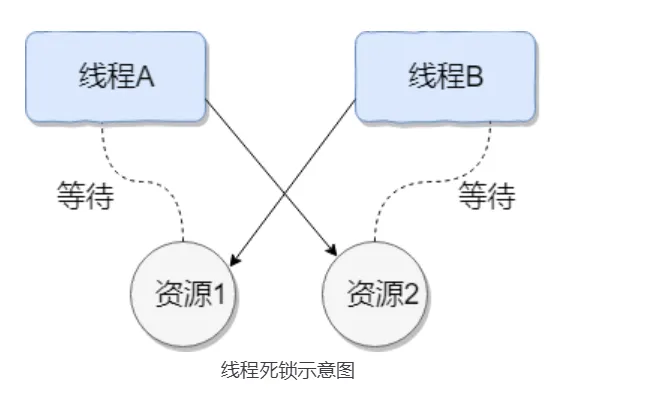
Code for this situation:
public class DeadLockDemo {
    private static Object resource1 = new Object();//Resource 1
    private static Object resource2 = new Object();//Resource 2

    public static void main(String[] args) {
        new Thread(() -> {
            synchronized (resource1) {
                System.out.println(Thread.currentThread() + "get resource1");
                try {
                    Thread.sleep(1000);
                } catch (InterruptedException e) {
                    e.printStackTrace();
                }
                System.out.println(Thread.currentThread() + "waiting get resource2");
                synchronized (resource2) {
                    System.out.println(Thread.currentThread() + "get resource2");
                }
            }
        }, "Thread 1").start();

        new Thread(() -> {
            synchronized (resource2) {
                System.out.println(Thread.currentThread() + "get resource2");
                try {
                    Thread.sleep(1000);
                } catch (InterruptedException e) {
                    e.printStackTrace();
                }
                System.out.println(Thread.currentThread() + "waiting get resource1");
                synchronized (resource1) {
                    System.out.println(Thread.currentThread() + "get resource1");
                }
            }
        }, "Thread 2").start();
    }
}Output:
Thread[Thread 1,5,main]get resource1
Thread[Thread 2,5,main]get resource2
Thread[Thread 1,5,main]waiting get resource2
Thread[Thread 2,5,main]waiting get resource1Thread A acquires the monitor lock of
resource1throughsynchronized (resource1), then sleeps for 1 second viaThread.sleep(1000);to allow Thread B to execute and acquire the monitor lock ofresource2. After both threads finish sleeping, they attempt to acquire each other’s resources, causing both threads to wait for each other indefinitely, resulting in deadlock.
Necessary conditions for deadlock:
- Mutual exclusion: The resource can only be occupied by one thread at any given time.
- Hold and wait: A thread blocks while requesting resources but holds onto already acquired resources.
- No preemption: Resources already acquired by a thread cannot be forcibly taken by other threads before completion; they can only be released by the thread itself after use.
- Circular wait: Multiple threads form a head-to-tail circular waiting relationship for resources.
Deadlock Handling#
How to detect deadlock?
Use commands like jmap and jstack to view JVM thread stack and heap memory.
- If there’s a deadlock,
jstackoutput typically containsFound one Java-level deadlock:, followed by deadlock-related thread information. In actual projects, you can also usetop,df,freecommands to check the operating system’s basic status, as deadlocks may cause excessive CPU and memory consumption. - Use tools like VisualVM and JConsole for diagnosis.
How to prevent and avoid thread deadlock?
Prevention: (Break necessary conditions)
- Break hold and wait condition: Request all resources at once.
- Break no preemption condition: When a thread holding partial resources requests additional resources and cannot acquire them, it can actively release its held resources.
- Break circular wait condition: Prevent through ordered resource requests. Request resources in a certain order and release resources in reverse order. This breaks the circular wait condition.
Avoidance: Use algorithms (such as the Banker’s algorithm) to calculate and evaluate resource allocation, ensuring the system enters a safe state.
Safe state means the system can allocate required resources to each thread according to some thread progression sequence (P1, P2, P3……Pn) until meeting each thread’s maximum resource demand, allowing each thread to complete successfully. The sequence
P1, P2, P3.....Pnis called a safe sequence.
Modifying Thread 2’s code to avoid deadlock:
new Thread(() -> {
            synchronized (resource1) {
                System.out.println(Thread.currentThread() + "get resource1");
                try {
                    Thread.sleep(1000);
                } catch (InterruptedException e) {
                    e.printStackTrace();
                }
                System.out.println(Thread.currentThread() + "waiting get resource2");
                synchronized (resource2) {
                    System.out.println(Thread.currentThread() + "get resource2");
                }
            }
}, "Thread 2").start();Output:
Thread[Thread 1,5,main]get resource1
Thread[Thread 1,5,main]waiting get resource2
Thread[Thread 1,5,main]get resource2
Thread[Thread 2,5,main]get resource1
Thread[Thread 2,5,main]waiting get resource2
Thread[Thread 2,5,main]get resource2

Process finished with exit code 0Thread 1 first acquires the monitor lock of resource1, preventing Thread 2 from acquiring it. Then Thread 1 acquires the monitor lock of resource2, which it can obtain. After Thread 1 releases its monitor locks on resource1 and resource2, Thread 2 can execute. This breaks the circular wait condition, thus avoiding deadlock.
volatile#
In Java, the volatile keyword ensures variable visibility. If we declare a variable as volatile, this instructs the JVM that this variable is shared and unstable, and should be read from main memory each time it’s used.
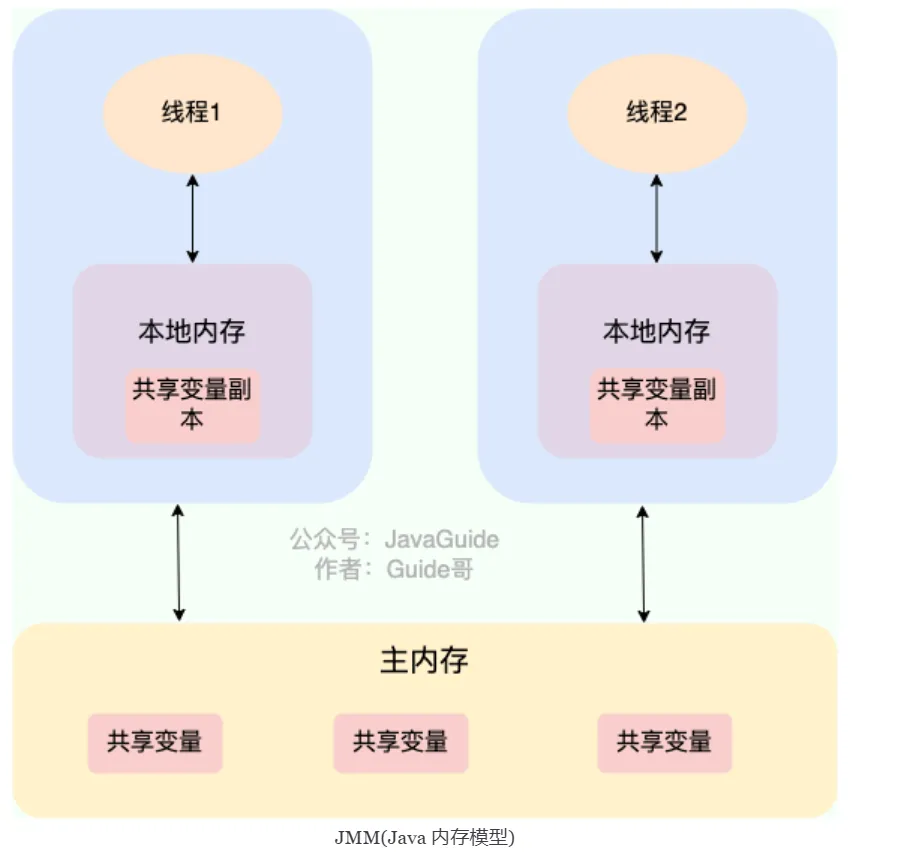
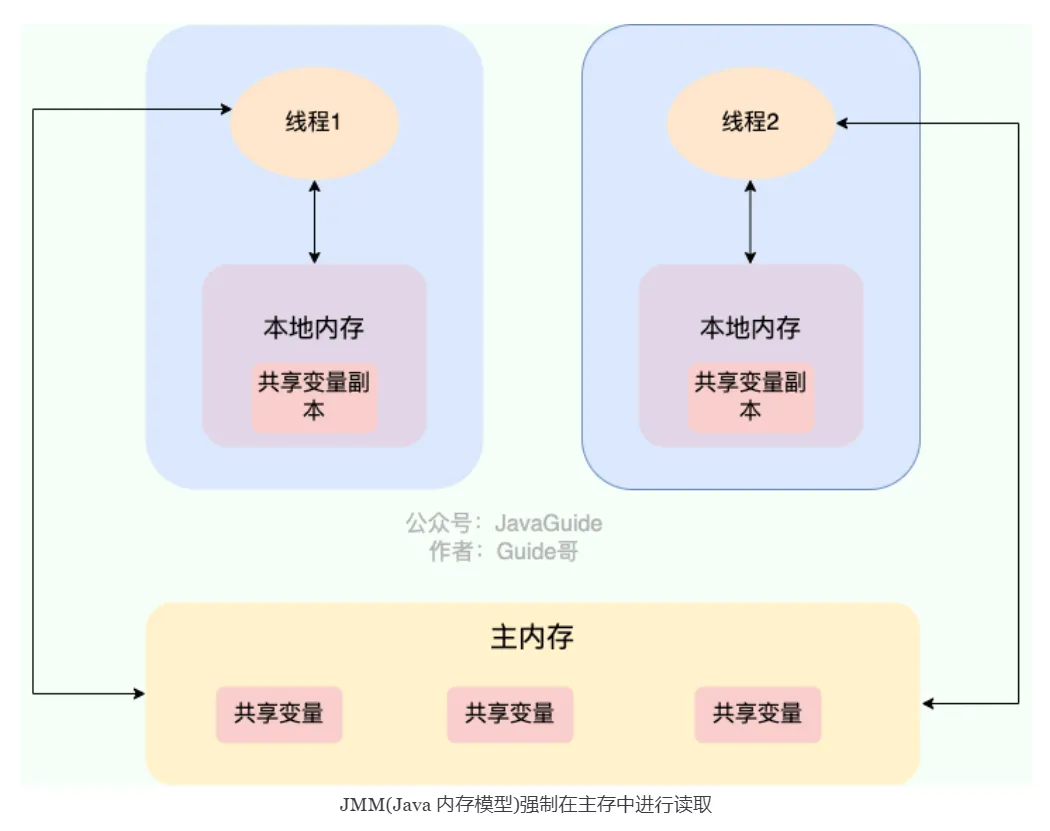
In C language: The original meaning is to disable CPU caching. It instructs the compiler that this variable is shared and unstable, and should be read from main memory each time it’s used.
The volatile keyword can guarantee data visibility but cannot guarantee data atomicity. The synchronized keyword can guarantee both.
Practical Case: Visibility Problem#
Problem Code:
public class VisibilityProblem {
    private static boolean flag = false; // No volatile

    public static void main(String[] args) throws InterruptedException {
        Thread writerThread = new Thread(() -> {
            try {
                Thread.sleep(1000);
            } catch (InterruptedException e) {
                e.printStackTrace();
            }
            flag = true; // Writer thread modifies flag
            System.out.println("Writer: flag set to true");
        });

        Thread readerThread = new Thread(() -> {
            while (!flag) {
                // May loop forever because it can't see flag modification
            }
            System.out.println("Reader: detected flag is true");
        });

        readerThread.start();
        writerThread.start();
    }
}Phenomenon: readerThread may loop forever because:
- JIT compiler may optimize
while(!flag)toif(!flag) while(true) - CPU caching causes readerThread to read the old value from cache
Solution:
private static volatile boolean flag = false; // Add volatileVerifying Visibility with JMH:
@State(Scope.Benchmark)
public class VolatileBenchmark {
    private boolean normalFlag = false;
    private volatile boolean volatileFlag = false;

    @Benchmark
    @BenchmarkMode(Mode.AverageTime)
    public void testNormalFlag() {
        normalFlag = true;
        while (!normalFlag) {
            // May be optimized
        }
    }

    @Benchmark
    @BenchmarkMode(Mode.AverageTime)
    public void testVolatileFlag() {
        volatileFlag = true;
        while (!volatileFlag) {
            // Guarantees visibility
        }
    }
}How to Ensure Variable Visibility?#
As detailed above
Direct interaction between main memory and working memory: When a variable is declared as volatile, whenever the variable is modified or read, the thread will directly read from or write to main memory. This allows all threads to see the variable’s latest value.
How to Prohibit Instruction Reordering?#
If we declare a variable as volatile, when performing read and write operations on this variable, specific memory barriers will be inserted to prohibit instruction reordering.
Refer to 2.5.2 Prohibiting Instruction Reordering ↗
A memory barrier is added, prohibiting instruction reordering optimization before and after the memory barrier through barrier insertion.
Can volatile Guarantee Atomicity?#
The volatile keyword can guarantee variable visibility but cannot guarantee that operations on the variable are atomic.
No
public class VolatileAtomicityDemo {
    public volatile static int inc = 0;

    public void increase() {
        inc++;
    }

    public static void main(String[] args) throws InterruptedException {
        ExecutorService threadPool = Executors.newFixedThreadPool(5);
        VolatileAtomicityDemo volatileAtomicityDemo = new VolatileAtomicityDemo();
        for (int i = 0; i < 5; i++) {
            threadPool.execute(() -> {
                for (int j = 0; j < 500; j++) {
                    volatileAtomicityDemo.increase();
                }
            });
        }
        // Wait 1.5 seconds to ensure the above program completes
        Thread.sleep(1500);
        System.out.println(inc);
        threadPool.shutdown();
    }
}For this code: Normally it should output 2500, but here the result is less than 2500.
The problem is that inc++ is actually a compound operation:
-
Read the value of
inc. -
Add 1 to
inc. -
Write the value of
incback to memory. Andvolatilecannot guarantee these three operations are atomic, which may lead to the following situation: -
Thread 1 reads inc but hasn’t modified it yet.
-
Thread 2 reads inc’s value and modifies it (+1), then writes inc’s value back to memory.
-
After Thread 2 completes, Thread 1 modifies inc’s value (+1) and writes inc’s value back to memory. This causes inc to only increase by 1 after two threads each perform an increment operation.
Improvement
Using
synchronized, Lock, or AtomicInteger can make the above code produce correct output.Using synchronized improvement:
public synchronized void increase() {
    inc++;
}Using AtomicInteger improvement:
public AtomicInteger inc = new AtomicInteger();

public void increase() {
    inc.getAndIncrement();
}Using ReentrantLock improvement:
Lock lock = new ReentrantLock();
public void increase() {
    lock.lock();
    try {
        inc++;
    } finally {
        lock.unlock();
    }
}Optimistic and Pessimistic Locks#
- Pessimistic Lock: Shared resources are only given to one thread at a time, other threads are blocked, and resources are transferred to other threads after use. (Examples:
synchronizedandReentrantLock)- In high-concurrency scenarios, pessimistic locks cause thread blocking due to intense lock competition, and a large number of blocked threads lead to system context switching, increasing system performance overhead. Additionally, pessimistic locks may have deadlock problems, affecting normal code execution.
Pessimistic locks always assume the worst case, believing that problems (such as shared data being modified) will occur every time shared resources are accessed, so they lock every time resources are acquired. This causes other threads wanting the resource to block until the lock is released by the previous holder.
- Optimistic Lock: Threads can continue executing without locking or waiting, only verifying whether the corresponding data was modified by other threads when submitting modifications (Examples:
AtomicInteger,LongAdderuse optimistic lock’s CAS implementation)- In high-concurrency scenarios, optimistic locks often outperform pessimistic locks in performance, as they don’t have lock competition causing thread blocking and no deadlock problems. If conflicts occur frequently (very high write ratio), frequent failures and retries will significantly impact performance, causing CPU spikes.
Summary:
- Pessimistic locks are typically used when writes are frequent (high write scenarios, intense competition), avoiding performance impact from frequent failures and retries. Pessimistic lock overhead is fixed. If optimistic locks solve the frequent failure and retry problem (such as LongAdder), optimistic locks can also be considered, depending on the actual situation.
- Optimistic locks are typically used when writes are infrequent (high read scenarios, less competition), avoiding performance impact from frequent locking. However, optimistic locks mainly target single shared variables (refer to atomic variable classes in the
java.util.concurrent.atomicpackage).
Optimistic Lock Implementation#
Optimistic locks are generally implemented using version number mechanisms or CAS algorithms (CAS algorithms are more common)
Version Number Mechanism#
Generally, a data version number version field is added to the data table, representing the number of times data has been modified. When data is modified, the version value increases by one. When Thread A wants to update a data value, it reads the data along with the version value. When submitting the update, if the version value just read equals the current database version value, it updates; otherwise, it retries the update operation until successful.
e.g., If two operation objects operate on the database, after the first object completes its database operation,
versionbecomes 2, and it submits theversionalong with the operated object. When the second operation object completes its operation,versionis still 1. When submitting, it discovers theversionis inconsistent, so the submission is rejected!
CAS Algorithm#
CAS stands for Compare And Swap (Compare and Swap), used to implement optimistic locks, widely applied in various frameworks. The CAS concept is simple: use an expected value to compare with the variable value to be updated, and only update if the two values are equal.
CAS is an atomic operation, relying on CPU atomic instructions at the bottom level
Atomic operation: Once an operation starts, it cannot be interrupted until completion.
CAS’s three operands:
- V(var): Variable value to update
- E(Expected): Expected value
- N(NEW): New value to write
Only when V===E will CAS use N to update V’s value, i.e., V<-N; otherwise, it abandons the update (it has already been updated at this point)
When multiple threads simultaneously use CAS to operate on a variable, only one will succeed and successfully update, the rest will fail. However, failed threads are not suspended; they are merely told they failed and allowed to try again, or they can choose to abandon the operation.
CAS Implementation#
Implemented through C++ and assembly, a key class is: Unsafe
Provided methods:
CAS’s specific implementation is closely related to the operating system and CPU.
/**
  *  CAS
  * @param o         Object containing the field to modify
  * @param offset    Offset of a field in the object
  * @param expected  Expected value
  * @param update    Update value
  * @return          true | false
  */
public final native boolean compareAndSwapObject(Object o, long offset,  Object expected, Object update);

public final native boolean compareAndSwapInt(Object o, long offset, int expected,int update);

public final native boolean compareAndSwapLong(Object o, long offset, long expected, long update);The java.util.concurrent.atomic package provides some classes for atomic operations. These classes utilize underlying atomic instructions to ensure operations are thread-safe in multi-threaded environments.
Atomic classes perform atomic operations on certain types of variables, utilizing low-level atomic operation methods provided by the Unsafe class to implement lock-free thread safety.
Summary of atomic classes: Atomic Classes Summary | JavaGuide ↗ Atomic Classes
AtomicInteger core source code:
// Get Unsafe instance
private static final Unsafe unsafe = Unsafe.getUnsafe();
private static final long valueOffset;

static {
    try {
        // Get memory offset of "value" field in AtomicInteger class
        valueOffset = unsafe.objectFieldOffset
            (AtomicInteger.class.getDeclaredField("value"));
    } catch (Exception ex) { throw new Error(ex); }
}
// Ensure visibility of "value" field
private volatile int value;

// If current value equals expected value, atomically set value to newValue
// Uses Unsafe#compareAndSwapInt method for CAS operation
public final boolean compareAndSet(int expect, int update) {
    return unsafe.compareAndSwapInt(this, valueOffset, expect, update);
}

// **Atomically** add delta to current value and return old value
public final int getAndAdd(int delta) {
    return unsafe.getAndAddInt(this, valueOffset, delta);
}

// **Atomically** add 1 to current value and return value before addition (old value)
// Uses Unsafe#getAndAddInt method for CAS operation.
public final int getAndIncrement() {
    return unsafe.getAndAddInt(this, valueOffset, 1);
}

// **Atomically** subtract 1 from current value and return value before subtraction (old value)
public final int getAndDecrement() {
    return unsafe.getAndAddInt(this, valueOffset, -1);
}Unsafe#getAndAddInt source code:
// Atomically get and increment integer value
public final int getAndAddInt(Object o, long offset, int delta) {
    int v;
    do {
        // Get integer value at memory offset in object o in volatile manner
        v = getIntVolatile(o, offset);
    } while (!compareAndSwapInt(o, offset, v, v + delta));
    // Return old value
    return v;
}The do-while in the getAndAddInt method reflects that when operations fail, it will continuously retry until success.
That is, the
getAndAddIntmethod will attempt to update thevaluethrough thecompareAndSwapIntmethod. If the update fails, it will retrieve the current value again and try to update again until the operation succeeds.
Since CAS operations may fail due to concurrent conflicts, they are typically paired with while loops, continuously retrying after failure until the operation succeeds. This is the spin lock mechanism.
CAS Problems#
- ABA Problem
This is the most common problem with CAS
If a variable V is initially read as value A, and when preparing to assign a value, it’s still value A, can we say its value hasn’t been modified by other threads? Obviously not, because during this time its value could have been changed to another value and then changed back to A, so the CAS operation would mistakenly think it was never modified. This problem is called the “ABA” problem of CAS operations.
Solution: Append version numbers or timestamps
After JDK1.5, the
AtomicStampedReferenceclass solves the ABA problem. ItscompareAndSetmethod first checks if the current reference equals the expected reference and if the current stamp equals the expected stamp. If both are equal, it atomically sets the reference and stamp values to the given update values.
- Long Loop Time, High Overhead CAS often uses spin operations for retries, meaning it keeps looping until success. If it doesn’t succeed for a long time, it will bring very high execution overhead to the CPU.
If the JVM can support the pause instruction provided by processors, the efficiency of spin operations will improve.
The pause instruction has two important functions:
- Delay pipeline execution: The pause instruction can delay instruction execution, thereby reducing CPU resource consumption. The specific delay time depends on the processor implementation version; on some processors, the delay time may be zero.
- Avoid memory order conflicts: When exiting a loop, the pause instruction can avoid CPU pipeline flushing due to memory order conflicts, thereby improving CPU execution efficiency.
- Can Only Guarantee Atomic Operations on One Shared Variable
CAS operations are only effective for single shared variables. When multiple shared variables need to be operated on, CAS becomes powerless. However, starting from JDK 1.5, Java provides the
AtomicReferenceclass, allowing us to guarantee atomicity between reference objects. By encapsulating multiple variables in one object, we can useAtomicReferenceto perform CAS operations.
Besides the AtomicReference approach, locking can also be used to guarantee.
synchronized*#
Mainly solves the synchronization of resource access between multiple threads, ensuring that methods or code blocks it modifies can only be executed by one thread at any given time.
Before JDK 6, it was a heavyweight lock (low efficiency)
Because the monitor lock depends on the underlying operating system’s
Mutex Lockfor implementation, Java threads are mapped to the operating system’s native threads. If you want to suspend or wake up a thread, the operating system needs to help complete it, and the operating system implementing thread switching needs to transition from user mode to kernel mode. This state transition requires relatively long time, with relatively high time costs.
After JDK 6: Introduced many optimizations such as spin locks, adaptive spin locks, lock elimination, lock coarsening, biased locks, lightweight locks, etc., to reduce lock operation overhead
synchronizedcan be used in projects Biased locks: Increased JVM complexity without bringing performance improvements to all applications.
- In JDK15, biased locks are disabled by default (can still be enabled with -XX:+UseBiasedLocking)
- In JDK18, biased locks have been completely deprecated (cannot be enabled via command line)
Locks mainly exist in four states, in order: no lock state, biased lock state, lightweight lock state, heavyweight lock state. They will gradually upgrade as competition intensifies. Note that locks can upgrade but not downgrade. This strategy is to improve the efficiency of acquiring and releasing locks.
Detailed explanation of lock upgrade principles: Analysis of synchronized Lock Upgrade Principles and Implementation - Xiaoxin’s Growth Path - Blog Garden ↗:
Modification Scenarios#
- Modifying instance methods
Locks the current object instance; must acquire the current object instance’s lock to enter
synchronized void method() {
    //Business code
}- Modifying static methods
Locks the current object instance; must acquire the current class’s lock to enter synchronized code
synchronized static void method() {
    //Business code
}- Modifying code blocks
synchronized(object)means you must acquire the given object’s lock before entering the synchronized code block.synchronized(Class.class)means you must acquire the givenClass’s lock before entering synchronized code
synchronized(this) {
    //Business code
}Try not to use synchronized(String a) because in the JVM, the string constant pool has caching functionality.
- For constructors
Although it cannot be directly modified on the method, it can be used inside the method (the method itself is thread-safe; if shared resource operations are involved in the constructor, appropriate synchronization measures need to be taken to ensure thread safety of the entire construction process.)
Underlying Principles#
Using the javap -v xx.class command to view bytecode files, you can see:
synchronized Synchronized Statement Block Case#
public class SynchronizedDemo {
    public void method() {
        synchronized (this) {
            System.out.println("synchronized code block");
        }
    }
}synchronizedsynchronized statement block implementation usesmonitorenterandmonitorexitinstructions, marking the start and end points respectively- There are two
monitorexitcommands to ensure the lock is correctly released in both cases: normal execution (after executing exit, it skips the exit at the exception location) and exception occurrence (executes the command afterward) - When executing
monitorenter, the thread attempts to acquire the lock, i.e., acquire ownership of the object monitormonitor
monitoris implemented based onc++; each object has a built-inObjectMonitorobject.- Methods like
wait/notifyalso depend on themonitorobject. This is why methods likewait/notifycan only be called in synchronized blocks or methods; otherwise, ajava.lang.IllegalMonitorStateExceptionexception will be thrown.
- When executing
monitorenter, it attempts to acquire the object’s lock. If the lock’s counter is 0, the lock can be acquired (lock acquisition successful), and after acquisition, the lock counter is set to 1, i.e., incremented by 1. If the counter is not 0, lock acquisition fails (the current thread needs to block and wait until the lock is released by another thread.) - After the
monitorexitinstruction executes, the lock counter is set to 0, indicating the lock is released and other threads can attempt to acquire the lock.
synchronized Modifying Methods Case#
public class SynchronizedDemo2 {
    public synchronized void method() {
        System.out.println("synchronized method");
    }
}- Methods modified by
synchronizeddon’t havemonitorenterandmonitorexitinstructions but have anACC_SYNCHRONIZEDflag. The JVM uses thisACC_SYNCHRONIZEDaccess flag to identify whether a method is declared as synchronized, thus executing the corresponding synchronization call. - If it’s an instance method, the JVM will attempt to acquire the instance object’s lock. If it’s a static method, the JVM will attempt to acquire the current
class’s lock.
But the essence of both is acquiring the object monitor monitor.
Detailed explanation of monitor: Java Locks and Threads ↗
What’s the Difference from volatile?*#
volatileis a lightweight implementation of thread synchronization, sovolatileperforms better than thesynchronizedkeyword. Butvolatilecan only be used for variables, whilesynchronizedcan modify methods and code blocks.volatilecan guarantee data visibility but cannot guarantee data atomicity.synchronizedcan guarantee both.- The
volatilekeyword mainly solves variable visibility between multiple threads, while thesynchronizedkeyword solves synchronization of resource access between multiple threads.
ReentrantLock#
ReentrantLock implements the Lock interface, is a reentrant and exclusive lock, similar to the synchronized keyword. However, ReentrantLock is more flexible and powerful, adding advanced features like polling, timeout, interruption, fair locks, and non-fair locks.
public class ReentrantLock implements Lock, java.io.Serializable {}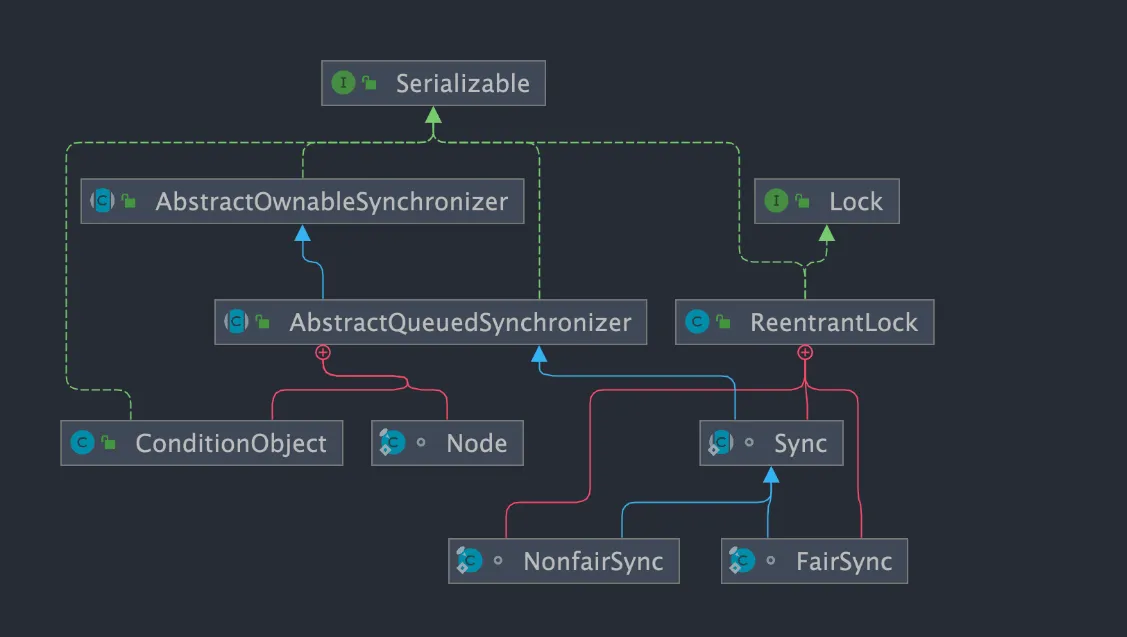
ReentrantLock has an inner class Sync, which extends AQS (AbstractQueuedSynchronizer). Most lock acquisition and release operations are actually implemented in Sync. Sync has two subclasses: fair lock FairSync and non-fair lock NonfairSync.
You can specify whether to use fair or non-fair locks
- Fair lock: After the lock is released, the thread that applied first gets the lock first. Performance is relatively poor because fair locks need to guarantee absolute time ordering, resulting in more frequent context switching.
- Non-fair lock: After the lock is released, threads that applied later may acquire the lock first, randomly or according to other priority ordering. Better performance, but may cause some threads to never acquire the lock.
// Pass a boolean value, true for fair lock, false for non-fair lock
public ReentrantLock(boolean fair) {
    sync = fair ? new FairSync() : new NonfairSync();
}ReentrantLock’s underlying implementation is based on AQS.
About AQS: AQS Detailed Explanation
Differences from synchronized*#
Both are reentrant locks: Also called recursive locks, meaning a thread can acquire its own internal lock again. For example, if a thread acquires a lock on an object, it can still acquire that object’s lock again when it wants to, even if the lock hasn’t been released yet. If it were a non-reentrant lock, this would cause deadlock.
Both Lock implementation classes and synchronized are reentrant.
Differences are reflected in:
synchronizeddepends on the JVM whileReentrantLockdepends on APIs.synchronizedis implemented at the virtual machine level and is not directly exposed to us.ReentrantLockis implemented by the JDK, and you can view its source code to see how it’s implemented.
ReentrantLockadds some advanced features compared tosynchronized:- Interruptible waiting:
ReentrantLockprovides a mechanism to interrupt threads waiting for locks throughlock.lockInterruptibly(). This means that during the process of waiting to acquire a lock, if another thread interrupts the current thread (interrupt()), the current thread will throw anInterruptedException, which can be caught for appropriate handling. - Can implement fair locks:
ReentrantLockcan specify fair or non-fair locks.synchronizedcan only be non-fair locks. - Can implement selective notification (locks can bind multiple conditions): The
synchronizedkeyword combined withwait()andnotify()/notifyAll()methods can implement wait/notify mechanisms. TheReentrantLockclass can also implement this, but needs the help of theConditioninterface andnewCondition()method. - Supports timeout:
ReentrantLockprovides thetryLock(timeout)method, which can specify the maximum waiting time for acquiring a lock. If the waiting time is exceeded, lock acquisition fails, and it won’t wait indefinitely.
- Interruptible waiting:
Supplement:
- Interruptible waiting: Understanding that
lockInterruptibly()can respond to interrupts- Basic function:
lockInterruptibly()attempts to acquire a lock, just likelock(). If the lock is available, the current thread will acquire the lock and continue execution. If the lock is already held by another thread, the current thread will be blocked until it acquires the lock. - Interrupt support: If the current thread calls
interrupt()to interrupt itself while callinglockInterruptibly()and being blocked,lockInterruptibly()will immediately throw anInterruptedException. - Use case:
lockInterruptibly()is typically used when responsiveness and interruptibility need to be guaranteed. For example, in situations where a thread waiting to acquire a lock might be blocked for a long time, interruption can be chosen to allow other tasks to continue executing.
- Basic function:
ConditioninterfaceConditionwas introduced in JDK1.5. It has good flexibility, such as implementing multi-way notification functionality, meaning multipleConditioninstances (i.e., object monitors) can be created in oneLockobject, providing more flexibility in thread scheduling.- When using
notify()/notifyAll()methods for notification, the notified thread is chosen by the JVM. UsingReentrantLockclass combined withConditioninstances can implement “selective notification”- The
synchronizedkeyword is equivalent to having only oneConditioninstance in the entire Lock object, with all threads registered on it. If thenotifyAll()method is executed, it will notify all threads in a waiting state, which causes significant efficiency problems. - The
Conditioninstance’ssignalAll()method will only wake up all waiting threads registered in thatConditioninstance.
- The
- Supports timeout: Why is the
tryLock(timeout)feature needed?- Prevent deadlock: In complex lock scenarios, allowing threads to give up and retry within a reasonable time can help prevent deadlock.
- Improve responsiveness: Prevents threads from blocking indefinitely.
- Handle time-sensitive operations: For operations with strict time limits, tryLock(timeout) allows threads to continue executing alternative operations when they cannot acquire the lock in time.
- What’s the difference between interruptible locks and non-interruptible locks?
- Interruptible lock: Can be interrupted during the process of acquiring the lock, without needing to wait until acquiring the lock before processing other logic.
ReentrantLockis an interruptible lock. - Non-interruptible lock: Once a thread applies for a lock, it can only process other logic after acquiring the lock.
synchronizedis a non-interruptible lock.
- Interruptible lock: Can be interrupted during the process of acquiring the lock, without needing to wait until acquiring the lock before processing other logic.
Misc#
Just understand these.
ReentrantReadWriteLock#
ReentrantReadWriteLock implements ReadWriteLock, is a reentrant read-write lock that can both guarantee the efficiency of multiple threads reading simultaneously and guarantee thread safety during write operations.
- General lock concurrency control rules: read-read mutual exclusion, read-write mutual exclusion, write-write mutual exclusion.
- Read-write lock concurrency control rules: read-read not mutually exclusive, read-write mutually exclusive, write-write mutually exclusive (only read-read is not mutually exclusive).
ReentrantReadWriteLockis actually two locks: one isWriteLock(write lock), one isReadLock(read lock). The read lock is a shared lock (one lock can be simultaneously acquired by multiple threads), the write lock is an exclusive lock (one lock can only be held by one thread at most). Read locks can be read simultaneously and held by multiple threads simultaneously, while write locks can be held by at most one thread at a time.
ReentrantReadWriteLock is also based on AQS implementation at the bottom level.
ReentrantReadWriteLock also supports fair and non-fair locks, using non-fair locks by default, which can be explicitly specified through the constructor.
Use case: In read-heavy, write-light situations, using ReentrantReadWriteLock can significantly improve system performance.
Why can’t read locks be upgraded to write locks? (Write locks can be downgraded to read locks, but read locks cannot be upgraded to write locks.)
- This is because upgrading read locks to write locks would cause thread contention. After all, write locks are exclusive locks, which would affect performance.
- Deadlock problems may occur. For example: Suppose two threads’ read locks both want to upgrade to write locks, then they both need the other to release their lock, but neither releases, resulting in deadlock.
StampedLock#
StampedLock is a read-write lock with better performance introduced in JDK 1.8, non-reentrant and doesn’t support condition variables Condition.
Unlike general Lock classes, StampedLock doesn’t directly implement the Lock or ReadWriteLock interfaces but is independently implemented based on CLH locks (AQS is also based on this).
Provides three modes of read-write control: read lock, write lock, and optimistic read.
- Write lock: Exclusive lock, only one thread can acquire one lock. When a thread acquires a write lock, other threads requesting read or write locks must wait. Similar to
ReentrantReadWriteLock’s write lock, but this write lock is non-reentrant. - Read lock (pessimistic read): Shared lock, when no thread has acquired a write lock, multiple threads can simultaneously hold read locks. If a thread already holds a write lock, other threads requesting that read lock will be blocked. Similar to
ReentrantReadWriteLock’s read lock, but this read lock is non-reentrant. - Optimistic read: Allows multiple threads to acquire optimistic read and read locks. Also allows one write thread to acquire a write lock.
Why is StampedLock’s performance better?
The additional optimistic read compared to traditional read-write locks is the key reason why StampedLock performs better than ReadWriteLock. StampedLock’s optimistic read allows one write thread to acquire a write lock, so it won’t cause all write threads to block, meaning when there are many reads and few writes, write threads have opportunities to acquire write locks, reducing thread starvation problems and greatly increasing throughput.
Use cases: Like ReentrantReadWriteLock, StampedLock is also suitable for read-heavy, write-light business scenarios and can be used as a replacement for ReentrantReadWriteLock with better performance.
However, note that StampedLock is non-reentrant, doesn’t support condition variables Condition, and doesn’t support interruption operations well (improper use can easily cause CPU spikes). If you need some advanced features of ReentrantLock, it’s not recommended to use StampedLock.
Additionally, although StampedLock performs well, it’s relatively troublesome to use. Once used improperly, production problems will occur. It’s strongly recommended to review the cases in the StampedLock official documentation before using it.
Underlying principles:
StampedLock doesn’t directly implement the Lock or ReadWriteLock interfaces but is based on CLH lock implementation (AQS is also based on this). CLH lock is an improvement on spin locks, an implicit linked list queue. StampedLock manages threads through CLH queues and represents lock state and type through the synchronization state value state.
Just understand AQS principles.
JMM#
JMM defines the access rules for shared variables in multi-threaded environments, centered around three issues: visibility, ordering, and atomicity.
JMM divides memory into two parts: main memory (shared by all threads, storing instance fields, static fields, array elements) and working memory (private to each thread, storing copies of main memory variables). All thread operations on variables go through the interaction between working memory and main memory. JMM defines 8 atomic operations (read, load, use, assign, store, write, lock, unlock) to govern this interaction.
- Visibility: One thread modifies a shared variable, other threads may not see it immediately.
volatileforces the modification to be flushed to main memory and invalidates other threads’ copies;synchronizedflushes to main memory before releasing the lock and reloads upon acquiring the lock; properly constructedfinalfields are visible to other threads. - Ordering: Compilers and processors may reorder instructions. JMM constrains visibility ordering through happens-before rules and prohibits specific reorderings via memory barriers.
- Atomicity: Compound operations like
i++can be interrupted.synchronizedguarantees atomicity through locking; atomic classes achieve lock-free atomic operations via CAS.
Happens-Before Rules#
If operation A happens-before operation B, then A’s results are visible to B, and A is ordered before B.
| Rule | Description |
|---|---|
| Program Order Rule | Within the same thread, each action happens-before every subsequent action in program order |
| Lock Rule | An unlock happens-before every subsequent lock on the same monitor |
| volatile Rule | A write to a volatile field happens-before every subsequent read of that field |
| Thread Start Rule | A call to Thread.start() happens-before every action in the started thread |
| Thread Termination Rule | Any action in a thread happens-before another thread detects that thread’s termination via Thread.join() or Thread.isAlive() |
| Transitivity | If A happens-before B and B happens-before C, then A happens-before C |
Memory Barriers#
JMM implements happens-before constraints through four types of memory barriers:
| Barrier Type | Effect |
|---|---|
| LoadLoad | Prevents reordering of subsequent reads before the barrier |
| StoreStore | Prevents reordering of subsequent writes before the barrier |
| LoadStore | Prevents reordering of a read with a subsequent write |
| StoreLoad | Prevents reordering of a write with a subsequent read (most expensive, inserted after volatile writes) |
volatile semantics: A volatile write flushes the value to main memory, preceded by a StoreStore barrier and followed by a StoreLoad barrier. A volatile read reloads from main memory, followed by LoadLoad and LoadStore barriers.
synchronized semantics: Acquiring a lock (monitorenter) invalidates the working memory, forcing a reload from main memory; releasing a lock (monitorexit) flushes working memory modifications back to main memory.
Common Cases#
Double-Checked Locking (DCL):
class Singleton {
    private static volatile Singleton instance;
    public static Singleton getInstance() {
        if (instance == null) {
            synchronized (Singleton.class) {
                if (instance == null) {
                    instance = new Singleton();
                }
            }
        }
        return instance;
    }
}Without volatile, the new Singleton() instruction (allocate → initialize → assign reference) could be reordered, causing another thread to see a partially constructed object.
Immutable Object with final:
class ImmutableObject {
    private final int x;
    public ImmutableObject(int x) { this.x = x; }
}Properly constructed final fields are safely visible to all threads without synchronization.
Common Misconceptions#
| Misconception | Correct Understanding |
|---|---|
volatile guarantees atomicity | Only guarantees atomicity for single read/write; compound operations still need locks or atomic classes |
synchronized completely prohibits reordering | Only guarantees ordering within the critical section; code outside can still be reordered |
| No visibility issues without contention | Even single-threaded, JIT optimizations may cause visibility issues (e.g., non-volatile variable in long loops) |
Atomic Classes#
Atomic classes in java.util.concurrent.atomic wrap the CAS mechanism discussed earlier into directly usable thread-safe tools. They use the Unsafe class to invoke hardware-level atomic instructions and volatile for visibility, achieving lock-free atomic operations.
The family covers basic types (AtomicInteger, AtomicLong, AtomicBoolean), reference types (AtomicReference, AtomicStampedReference with version number to prevent ABA), array types (AtomicIntegerArray, etc.), field updaters (AtomicIntegerFieldUpdater for atomic field updates without replacing the entire object), and Java 8’s high-performance counters (LongAdder, DoubleAdder).
Core usage of AtomicInteger:
AtomicInteger counter = new AtomicInteger(0);
counter.incrementAndGet();                       // atomic increment
counter.updateAndGet(x -> x * 2);                // atomic functional update
boolean ok = counter.compareAndSet(2, 5); // CASLongAdder suits high-contention write-many-read-few scenarios. Unlike AtomicLong where all threads contend for the same CAS variable, it distributes hot spots across multiple Cell objects—writes likely operate on the thread’s own Cell, reads aggregate the results. It trades eventual consistency for throughput. For low contention, AtomicInteger/AtomicLong is simpler; for high contention, LongAdder wins.
Atomic classes cannot solve compound operation races: if (counter.get() < 10) counter.incrementAndGet() can still be interleaved. Use a CAS retry loop or fall back to synchronized.
Thread Pools and ThreadLocal#
ThreadLocal#
Solves the problem of letting each thread have its own dedicated local variable, similar to local memory in Pthread from parallel processing courses
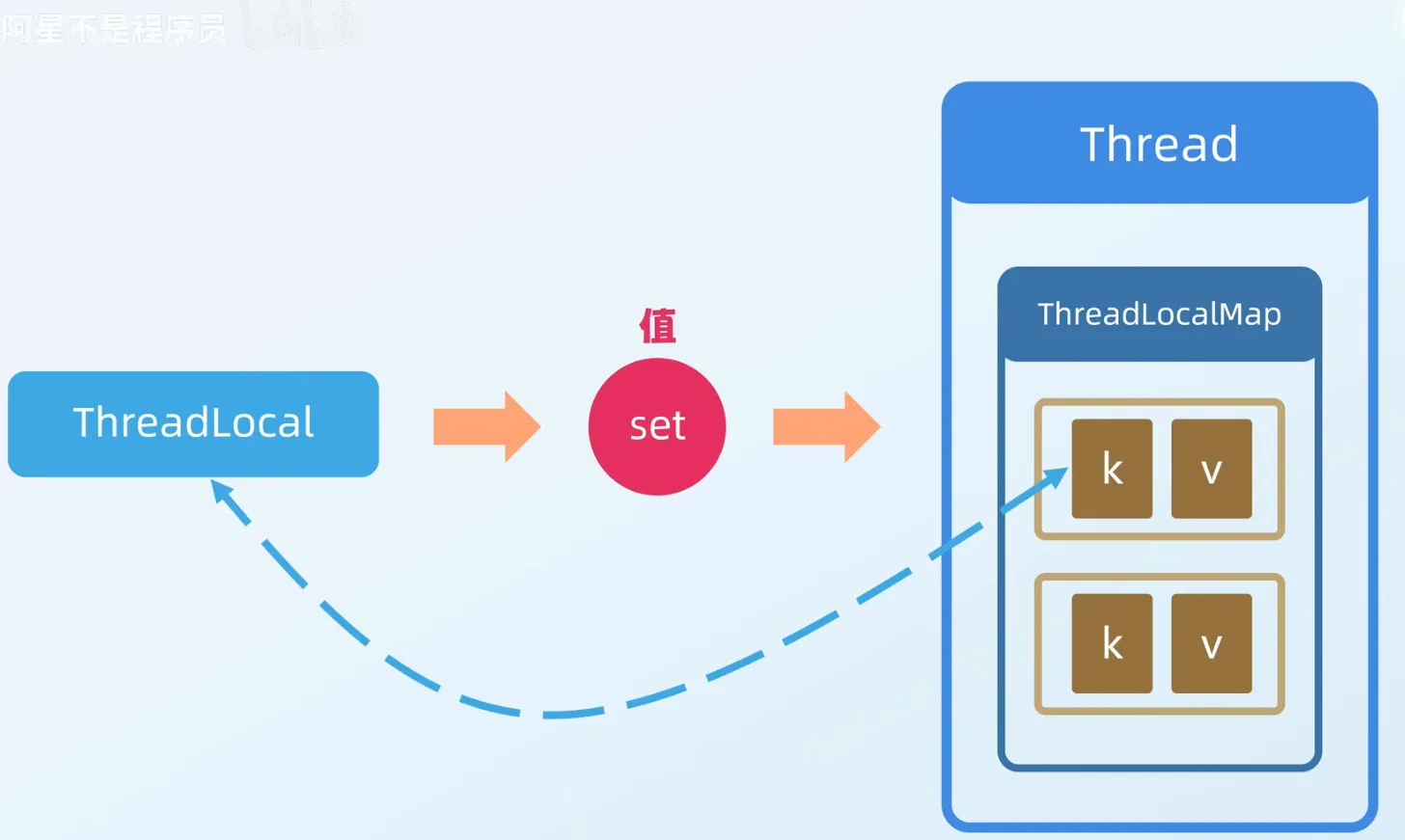
The ThreadLocal class allows each thread to bind its own value. It can be vividly compared to a “box for storing data”. Each thread has its own independent box for storing private data, ensuring data between different threads doesn’t interfere with each other.
I personally think this video explains it clearly:
- ThreadLocal Implementation Principles and Memory Leak Issues_bilibili ↗
- Someone wrote related notes, in the computer’s:
E:\\Download_copy\\IDM_Download\\JavaNote-mainfolder, can be referenced - Heima’s notes:
E:\\Download_copy\\IDM_Download\\并发编程笔记
Like the so-called relatively complete materials (as backup materials when you can’t understand javaguide, because you simply can’t finish reading them all, time is paramount)
Reading this should be enough to understand.
Possible questions that might be asked:
- ThreadLocal Principles
- Memory Leak Issues Caused
- How to pass ThreadLocal values across threads?
ThreadLocal Principles#
Principles are similar to:
ThreadLocal Cleanup and Expansion#
ThreadLocalMap uses two core methods, replaceStaleEntry and expungeStaleEntry, to automatically clean up expired Entries (those with Entry.key == null), mitigating memory leaks.
replaceStaleEntry is triggered in set() when the current slot’s Entry has expired. It scans backward to find the earliest expired Entry in the contiguous run, scans forward to find a matching key or additional expired Entries, replaces the value and swaps slots, then calls expungeStaleEntry to clean the full segment:
private void replaceStaleEntry(ThreadLocal<?> key, Object value, int staleSlot) {
    Entry[] tab = table;
    int len = tab.length;
    // Scan backward to find the first stale entry
    int slotToExpunge = staleSlot;
    for (int i = staleSlot - 1; i >= 0 && tab[i] != null; i--)
        if (tab[i].refersTo(null))
            slotToExpunge = i;
    // Scan forward for matching key or more stale entries
    for (int i = staleSlot + 1; i < len && tab[i] != null; i++)
        if (tab[i].refersTo(key)) { ... }
    // If no matching key, create new entry at staleSlot
    tab[staleSlot].value = null;
    tab[staleSlot] = new Entry(key, value);
    // Clean up
    if (slotToExpunge != staleSlot)
        expungeStaleEntry(slotToExpunge);
}expungeStaleEntry is triggered in get() or remove() when an expired Entry is encountered. It clears the specified slot and continues scanning forward, cleaning any expired Entries it finds and rehashing valid ones:
private int expungeStaleEntry(int staleSlot) {
    Entry[] tab = table; int len = tab.length;
    tab[staleSlot].value = null; tab[staleSlot] = null;  // clear stale entry
    size--;
    for (int i = staleSlot + 1; i < len && tab[i] != null; i++) {
        Entry e = tab[i];
        if (e.refersTo(null)) { e.value = null; tab[i] = null; size--; }
        else { /* rehash if needed */ }
    }
    return i;
}Expansion follows a clean-before-expand strategy: initial capacity 16, threshold = capacity × 2/3. When size ≥ threshold, a full cleanup of expired Entries runs first. Only if size ≥ threshold × 3/4 after cleanup does a real expansion occur—capacity doubles and all valid Entries are rehashed.
| Mechanism | Advantage | Cost |
|---|---|---|
| Weak reference keys + auto-cleanup | Reduces memory leak risk | Adds overhead to set/get operations |
| Lazy cleanup | Avoids full table scans | May leave some expired Entries |
| Clean-before-expand | Only expands for truly needed data | Higher expansion cost |
Auto-cleanup recovers Entries whose weak-reference keys have been collected, but the strong reference to the value still requires explicit remove()—especially critical in thread pool scenarios.
Memory Leak Issues Caused#
Memory leak issues can be resolved by calling the remove method. When necessary, use try... finally to prevent memory leaks
Passing ThreadLocal Values Across Threads#
Using code to illustrate:
For InheritableThreadLocal: Allows child threads to inherit parent thread’s ThreadLocal values. When creating a child thread, the parent thread’s InheritableThreadLocal values are copied to the child thread.
- Each thread internally maintains a
ThreadLocalMapfor storingThreadLocalvalues.InheritableThreadLocalcopies the parent thread’sInheritableThreadLocalvalues to the child thread’sThreadLocalMapwhen creating the child thread.
public class InheritableThreadLocalExample {
    private static InheritableThreadLocal<String> inheritableThreadLocal = new InheritableThreadLocal<>();

    public static void main(String[] args) {
        // Set InheritableThreadLocal value in main thread
        inheritableThreadLocal.set("Hello from parent thread");

        // Create child thread
        Thread childThread = new Thread(() -> {
            // Get InheritableThreadLocal value in child thread
            String value = inheritableThreadLocal.get();
            System.out.println("Child thread value: " + value);
        });

        // Start child thread
        childThread.start();

        // Wait for child thread to complete
        try {
            childThread.join();
        } catch (InterruptedException e) {
            e.printStackTrace();
        }
    }
}For TransmittableThreadLocal (Alibaba enhanced InheritableThreadLocal through decorator pattern, ensuring correct ThreadLocal value passing in thread pools.)
The key point here is actually just one: Thread pools reuse threads. Regular
InheritableThreadLocalonly copies context when threads are created, so reused threads can’t get new values;TransmittableThreadLocalwraps tasks, bringing the context at the moment of task submission along.
import com.alibaba.ttl.TransmittableThreadLocal;
import java.util.concurrent.ExecutorService;
import java.util.concurrent.Executors;

public class TransmittableThreadLocalExample {
    private static TransmittableThreadLocal<String> transmittableThreadLocal = new TransmittableThreadLocal<>();

    public static void main(String[] args) {
        // Set TransmittableThreadLocal value in main thread
        transmittableThreadLocal.set("Hello from parent thread");

        // Create thread pool
        ExecutorService executorService = Executors.newFixedThreadPool(2);

        // Submit task to thread pool
        executorService.submit(() -> {
            // Get TransmittableThreadLocal value in child thread
            String value = transmittableThreadLocal.get();
            System.out.println("Child thread value: " + value);
        });

        // Shutdown thread pool
        executorService.shutdown();
    }
}Thread Pools#
Manages a pool of thread resources. When there are tasks to process, threads are directly obtained from the thread pool for processing. After processing, threads are not immediately destroyed but wait for the next task
- Reduces resource consumption. Reduces consumption caused by thread creation and destruction through reusing already created threads.
- Improves response speed. When tasks arrive, tasks can be executed immediately without waiting for thread creation.
- Improves thread manageability. Threads are scarce resources. If created without limit, they will not only consume system resources but also reduce system stability. Thread pools can be used for unified allocation, tuning, and monitoring. How to create thread pools?
Ways to Create Thread Pools:#
- Create through
ThreadPoolExecutorconstructor (recommended) - Create through
Executorframework’s utility classExecutors. (Can create different types of thread pools)FixedThreadPool, fixed number of threads. If there are extra tasks and no idle threads, they will be temporarily stored in the task queue and processed when idle.- Bounded blocking queue is
LinkedBlockingQueue
- Bounded blocking queue is
SingleThreadExecutor: The difference from above is this thread pool has only one thread, everything else is the sameCachedThreadPool: Number of threads is uncertain, but when there are reusable threads, priority is given to reusable threads. If full, new threads are created to process tasks- Synchronous queue
SynchronousQueue
- Synchronous queue
ScheduledThreadPool: Thread pool that runs tasks after a given delay or executes tasks periodically.- Unbounded delay blocking queue
DelayedWorkQueue
- Unbounded delay blocking queue
What are the Common Thread Pool Parameters? How to Explain Them?#
public ThreadPoolExecutor(int corePoolSize,//Core thread count in thread pool
                              int maximumPoolSize,//Maximum thread count in thread pool
                              long keepAliveTime,//When thread count exceeds core thread count, maximum survival time for excess idle threads
                              TimeUnit unit,//Time unit
                              BlockingQueue<Runnable> workQueue,//Task queue, used to store tasks waiting to be executed
                              ThreadFactory threadFactory,//Thread factory, used to create threads, generally default is fine
RejectedExecutionHandler handler//Rejection policy, when submitted tasks are too many and cannot be processed in time, we can customize policies to handle tasksIf
allowCoreThreadTimeOut(boolean value)is used and set totrue, core threads can be reclaimed, with time interval still determined bykeepAliveTime
Regarding Rejection Policies:#
When the number of currently running threads reaches maximum thread count and the queue is also full of tasks
ThreadPoolExecutor.AbortPolicy: ThrowsRejectedExecutionExceptionto reject new task processing.ThreadPoolExecutor.callerRunsPolicy: Calls the executor’s own thread to run tasks, meaning directly runs (run) rejected tasks in the thread calling theexecutemethod. If the executor has shut down, the task will be discarded. Therefore, this policy will reduce the submission speed of new tasks, affecting overall program performance. If your application can tolerate this delay and you require that any task request be executed, you can choose this policy.ThreadPoolExecutor.DiscardPolicy: Doesn’t process new tasks, directly discards them.ThreadPoolExecutor.DiscardOldestPolicy: This policy will discard the earliest unprocessed task request.
For callerRunsPolicy, it won’t discard tasks and can allow all tasks to be executed. What risks does this rejection policy have? How to solve them?
- Risk: For tasks handled by the calling thread, it may cause the main thread to be blocked for a long time, preventing subsequent tasks from being received in a timely manner.
- Solution: Reasonably adjust the blocking queue capacity and maximum pool size, or introduce task persistence and backpressure mechanisms.
The essence of this problem is that we don’t want any task to be discarded. If server resources reach their limit, what scheduling strategy should be changed (to ensure tasks aren’t discarded and are processed in time when server has capacity)?
Task Persistence: Several methods:
- Design a task table to store tasks in MySQL database.
- Redis caches tasks.
- Submit tasks to message queue.
For the first method:
- Implement
RejectedExecutionHandlerinterface to customize rejection policy. The custom rejection policy is responsible for persisting tasks that the thread pool temporarily cannot handle (blocking queue is full at this time) to database (save to MySQL) - Inherit
BlockingQueueto implement a hybrid blocking queue that contains JDK’s built-in ArrayBlockingQueue. Additionally, this hybrid blocking queue needs to modify the logic for taking tasks for processing, i.e., override thetake()method. When taking tasks, priority is given to reading the earliest task from the database. When there are no tasks in the database, then take tasks fromArrayBlockingQueue.
For Netty’s handling method: Directly create a thread outside the thread pool to handle these tasks. To ensure real-time task processing, this approach may require good hardware equipment and the temporarily created threads cannot be accurately monitored For ActiveMQ’s handling method: Try to enqueue tasks within a specified time limit as much as possible to ensure maximum delivery:
For commonly used blocking queues:
LinkedBlockingQueuewith capacity of Integer.MAX_VALUE (bounded blocking queue):FixedThreadPoolandSingleThreadExecutor. FixedThreadPool can only create core thread count threads (core thread count and maximum thread count are equal),SingleThreadExecutorcan only create one thread (both core thread count and maximum thread count are 1), so their task queues will never be full.SynchronousQueue(synchronous queue):CachedThreadPool.SynchronousQueuehas no capacity, doesn’t store elements. Its purpose is to ensure that for submitted tasks, if there are idle threads, use idle threads to process; otherwise, create a new thread to process tasks. In other words,CachedThreadPool’s maximum thread count is Integer.MAX_VALUE, which can be understood as thread count can expand infinitely, potentially creating a large number of threads, leading to OOM.DelayedWorkQueue(delay queue):ScheduledThreadPoolandSingleThreadScheduledExecutor.DelayedWorkQueue’s internal elements are not sorted by insertion time but sorted by delay time length, with internal implementation using “heap” data structure, ensuring each dequeued task is the one with the earliest execution time in the current queue.DelayedWorkQueueautomatically expands when full, increasing original capacity by 50%, i.e., never blocks, can expand up to Integer.MAX_VALUE, so it can only create core thread count threads.ArrayBlockingQueue(bounded blocking queue): Bottom layer implemented by array, capacity cannot be modified once created
Thread Pool Task Processing Flow#
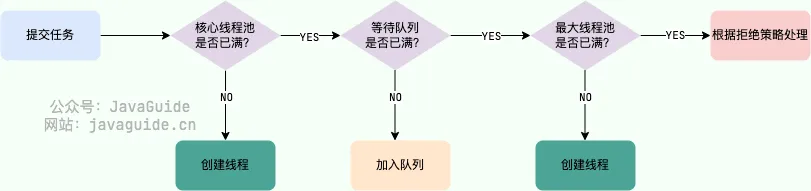
Can thread pools create threads in advance before submitting tasks?
prestartCoreThread(): Starts one thread, waits for tasks. If core thread count is already reached, this method returns false, otherwise returns true;prestartAllCoreThreads(): Starts all core threads and returns the number of successfully started core threads.
After Thread Exception in Thread Pool, Destroy or Reuse?#
- Using
execute()to submit tasks: When tasks are submitted to the thread pool throughexecute()and throw exceptions during execution, if this exception is not caught within the task, the exception will cause the current thread to terminate, and the exception will be printed to console or log file. The thread pool will detect this thread termination and create a new thread to replace it, thus maintaining the configured thread count unchanged. - Using
submit()to submit tasks: For tasks submitted throughsubmit(), if exceptions occur during task execution, these exceptions won’t be directly printed. Instead, the exception will be encapsulated in theFutureobject returned bysubmit(). When callingFuture.get()method, anExecutionExceptioncan be caught. In this case, the thread won’t terminate due to the exception; it will continue to exist in the thread pool, ready to execute subsequent tasks.
This design allows submit() to provide more flexible error handling mechanisms, as it allows callers to decide how to handle exceptions, while execute() is suitable for scenarios that don’t need to care about execution results.
How to Name Threads#
- Using guava’s
ThreadFactoryBuilder
ThreadFactory threadFactory = new ThreadFactoryBuilder()
                        .setNameFormat(threadNamePrefix + "-%d")
                        .setDaemon(true).build();
ExecutorService threadPool = new ThreadPoolExecutor(corePoolSize, maximumPoolSize, keepAliveTime, TimeUnit.MINUTES, workQueue, threadFactory);- Custom
ThreadFactory
import java.util.concurrent.ThreadFactory;
import java.util.concurrent.atomic.AtomicInteger;

/**
 * Thread factory that sets thread names, helping us locate problems.
 */
public final class NamingThreadFactory implements ThreadFactory {

    private final AtomicInteger threadNum = new AtomicInteger();
    private final String name;

    /**
     * Create a named thread pool factory
     */
    public NamingThreadFactory(String name) {
        this.name = name;
    }

    @Override
    public Thread newThread(Runnable r) {
        Thread t = new Thread(r);
        t.setName(name + " [#" + threadNum.incrementAndGet() + "]");
        return t;
    }
}Dynamically Modifying Thread Pool Parameters#
Using:
setCorePoolSize(int corePoolSize): Set core thread count.setMaximumPoolSize(int maximumPoolSize): Set maximum thread count.setKeepAliveTime(long time, TimeUnit unit): Set idle survival time for non-core threads.allowCoreThreadTimeOut(boolean value): Set whether to allow core threads to be reclaimed when idle.
Example of modifying thread parameters:
import java.util.concurrent.*;

public class DynamicThreadPoolExample {
    public static void main(String[] args) throws InterruptedException {
        // Initial parameters
        int corePoolSize = 2;
        int maximumPoolSize = 4;
        long keepAliveTime = 10;
        TimeUnit unit = TimeUnit.SECONDS;
        BlockingQueue<Runnable> workQueue = new LinkedBlockingQueue<>(2);
        ThreadFactory threadFactory = Executors.defaultThreadFactory();
        RejectedExecutionHandler handler = new ThreadPoolExecutor.AbortPolicy();

        // Create thread pool
        ThreadPoolExecutor executor = new ThreadPoolExecutor(
                corePoolSize,
                maximumPoolSize,
                keepAliveTime,
                unit,
                workQueue,
                threadFactory,
                handler
        );

        // Submit initial tasks
        for (int i = 1; i <= 6; i++) {
            final int taskId = i;
            try {
                executor.submit(() -> {
                    System.out.println("Task " + taskId + " is running on thread " + Thread.currentThread().getName());
                    try {
                        Thread.sleep(2000); // Simulate task execution time
                    } catch (InterruptedException e) {
                        e.printStackTrace();
                    }
                });
            } catch (RejectedExecutionException e) {
                System.out.println("Task " + taskId + " was rejected");
            }
        }

        // Dynamically adjust thread pool parameters
        Thread.sleep(3000); // Wait for a while
        System.out.println("Adjusting thread pool parameters...");

        // Increase core thread count and maximum thread count
        executor.setCorePoolSize(4);
        executor.setMaximumPoolSize(6);

        // Submit more tasks
        for (int i = 7; i <= 12; i++) {
            final int taskId = i;
            try {
                executor.submit(() -> {
                    System.out.println("Task " + taskId + " is running on thread " + Thread.currentThread().getName());
                    try {
                        Thread.sleep(2000); // Simulate task execution time
                    } catch (InterruptedException e) {
                        e.printStackTrace();
                    }
                });
            } catch (RejectedExecutionException e) {
                System.out.println("Task " + taskId + " was rejected");
            }
        }

        // Shutdown thread pool
        executor.shutdown();
    }
}After modification, the modified parameters will take effect for subsequent tasks
Thread Pool Monitoring in Practice#
1. Using ThreadPoolExecutor’s Monitoring Methods:
ThreadPoolExecutor executor = new ThreadPoolExecutor(...);

// Periodically monitor thread pool status
ScheduledExecutorService monitor = Executors.newScheduledThreadPool(1);
monitor.scheduleAtFixedRate(() -> {
    System.out.println("=== Thread Pool Monitoring ===");
    System.out.println("Core thread count: " + executor.getCorePoolSize());
    System.out.println("Maximum thread count: " + executor.getMaximumPoolSize());
    System.out.println("Current thread count: " + executor.getPoolSize());
    System.out.println("Active thread count: " + executor.getActiveCount());
    System.out.println("Queue size: " + executor.getQueue().size());
    System.out.println("Completed task count: " + executor.getCompletedTaskCount());
    System.out.println("Total task count: " + executor.getTaskCount());
    System.out.println("==================");
}, 0, 5, TimeUnit.SECONDS);2. Using JMX to Monitor Thread Pool:
import java.lang.management.ManagementFactory;
import javax.management.*;

public class ThreadPoolMonitor implements ThreadPoolMonitorMBean {
    private final ThreadPoolExecutor executor;

    public ThreadPoolMonitor(ThreadPoolExecutor executor) {
        this.executor = executor;
        // Register MBean
        try {
            MBeanServer mbs = ManagementFactory.getPlatformMBeanServer();
            ObjectName name = new ObjectName("com.example:type=ThreadPool");
            mbs.registerMBean(this, name);
        } catch (Exception e) {
            e.printStackTrace();
        }
    }

    @Override
    public int getActiveCount() {
        return executor.getActiveCount();
    }

    @Override
    public int getQueueSize() {
        return executor.getQueue().size();
    }

    @Override
    public long getCompletedTaskCount() {
        return executor.getCompletedTaskCount();
    }
}

// Use JConsole or VisualVM to connect and view3. Using Micrometer for Integrated Monitoring:
import io.micrometer.core.instrument.MeterRegistry;
import io.micrometer.core.instrument.binder.jvm.ExecutorServiceMetrics;

ThreadPoolExecutor executor = new ThreadPoolExecutor(...);

// Bind to Micrometer
ExecutorServiceMetrics.monitor(meterRegistry, executor, "my-thread-pool");

// Can export to Prometheus, Grafana, and other monitoring systemsThread Pool Tuning in Practice#
Problem 1: Thread Pool Rejecting Tasks
Phenomenon:
Exception in thread "main" java.util.concurrent.RejectedExecutionException
at java.util.concurrent.ThreadPoolExecutor$AbortPolicy.rejectedExecutionDiagnosis Steps:
// 1. Check thread pool configuration
System.out.println("Core thread count: " + executor.getCorePoolSize());
System.out.println("Maximum thread count: " + executor.getMaximumPoolSize());
System.out.println("Queue capacity: " + executor.getQueue().remainingCapacity());

// 2. Check current status
System.out.println("Current thread count: " + executor.getPoolSize());
System.out.println("Active thread count: " + executor.getActiveCount());
System.out.println("Queue size: " + executor.getQueue().size());Solutions:
// Solution 1: Increase queue capacity
BlockingQueue<Runnable> workQueue = new LinkedBlockingQueue<>(1000);

// Solution 2: Increase maximum thread count
executor.setMaximumPoolSize(20);

// Solution 3: Use CallerRunsPolicy (let caller execute)
RejectedExecutionHandler handler = new ThreadPoolExecutor.CallerRunsPolicy();

// Solution 4: Custom rejection policy (log + alert)
RejectedExecutionHandler customHandler = (r, executor) -> {
    logger.error("Task rejected: {}", r.toString());
    // Send alert
    alertService.sendAlert("Thread pool task rejected");
    // Can choose to persist task
    taskRepository.save(r);
};Problem 2: Too Many Threads Causing High CPU
Diagnosis Steps:
# 1. View process CPU usage
top -p <pid>

# 2. View thread CPU usage
top -H -p <pid>

# 3. Use jstack to view thread stack
jstack <pid> > thread_dump.txt

# 4. Analyze thread stack, find threads with high CPU usage
# Convert thread ID to hexadecimal, search in thread_dump.txt
printf "%x\n" <thread_id>Solutions:
// 1. Reasonably set core thread count
// CPU-intensive: corePoolSize = CPU cores + 1
int corePoolSize = Runtime.getRuntime().availableProcessors() + 1;

// IO-intensive: corePoolSize = CPU cores * 2
int corePoolSize = Runtime.getRuntime().availableProcessors() * 2;

// 2. Set thread idle reclaim time
executor.setKeepAliveTime(60, TimeUnit.SECONDS);
executor.allowCoreThreadTimeOut(true);Problem 3: Slow Task Execution
Diagnosis Steps:
// 1. Record task execution time
ThreadPoolExecutor executor = new ThreadPoolExecutor(...) {
    @Override
    protected void beforeExecute(Thread t, Runnable r) {
        super.beforeExecute(t, r);
        startTime.set(System.currentTimeMillis());
    }

    @Override
    protected void afterExecute(Runnable r, Throwable t) {
        try {
            long endTime = System.currentTimeMillis();
            long duration = endTime - startTime.get();
            if (duration > 1000) {
                logger.warn("Task execution time: {}ms", duration);
            }
        } finally {
            startTime.remove();
        }
        super.afterExecute(r, t);
    }
};

// 2. Use VisualVM or JProfiler for analysis
// 3. Check for deadlocks
ThreadMXBean threadMXBean = ManagementFactory.getThreadMXBean();
long[] deadlockedThreads = threadMXBean.findDeadlockedThreads();
if (deadlockedThreads != null) {
    logger.error("Deadlocked threads found: {}", Arrays.toString(deadlockedThreads));
}Best Practices Summary:
- Choose appropriate thread count based on task type (CPU-intensive vs IO-intensive)
- Use bounded queues to avoid OOM
- Custom thread names for easier problem diagnosis
- Implement monitoring and alerting mechanisms
- Use
submit()instead ofexecute()for easier exception handling - Gracefully shutdown thread pool (
shutdown()instead ofshutdownNow())
How to Design a Dynamic Thread Pool?#
So how to design a dynamic thread pool?
(May be asked in interviews)
deepseek’s code:
Code: ThreadPool/DynamicThreadPool
Need to customize ResizableCapacityLinkedBlockingQueue
class ResizableCapacityLinkedBlockingQueue<E> extends LinkedBlockingQueue<E> {
    private final AtomicInteger capacity; // Use AtomicInteger to support dynamic capacity adjustment

    public ResizableCapacityLinkedBlockingQueue(int capacity) {
        super(capacity); // Initialize queue capacity
        this.capacity = new AtomicInteger(capacity);
    }

    public synchronized void setCapacity(int newCapacity) {
        if (newCapacity < size()) {
            throw new IllegalArgumentException("New capacity cannot be less than current size");
        }
        this.capacity.set(newCapacity);
    }

    public int getCapacity() {
        return capacity.get();
    }

    @Override
    public boolean offer(E e) {
        // Check if current queue size exceeds capacity
        if (size() >= capacity.get()) {
            return false; // Queue is full, reject addition
        }
        return super.offer(e);
    }

    @Override
    public boolean offer(E e, long timeout, TimeUnit unit) throws InterruptedException {
        // Check if current queue size exceeds capacity
        if (size() >= capacity.get()) {
            return false; // Queue is full, reject addition
        }
        return super.offer(e, timeout, unit);
    }

    @Override
    public void put(E e) throws InterruptedException {
        // Check if current queue size exceeds capacity
        while (size() >= capacity.get()) {
            Thread.yield(); // Wait for queue to have free space
        }
        super.put(e);
    }
}How to Design a Thread Pool That Executes Tasks Based on Priority?#
There are two approaches:
- Tasks submitted to the thread pool implement the
Comparableinterface and override thecompareTomethod to specify priority comparison rules between tasks. - Pass a
Comparatorobject when creatingPriorityBlockingQueueto specify sorting rules between tasks (recommended).
Potential problems:
PriorityBlockingQueueis unbounded, may accumulate a large number of requests, leading to OOM.- May cause starvation problems, i.e., low-priority tasks don’t get executed for a long time.
- Due to the need to sort elements in the queue and ensure thread safety (concurrency control uses reentrant lock
ReentrantLock), performance will be reduced.
Solutions: (corresponding to above problems)
- Inherit PriorityBlockingQueue and override the offer method (enqueue) logic. When the number of inserted elements exceeds a specified value, return false.
- Solve through optimization design (more troublesome), such as tasks waiting too long will be removed and re-added to the queue, but with elevated priority.
- () Performance impact is unavoidable, as tasks need to be sorted. And for most business scenarios, this performance impact is acceptable.
Future#
For Future and AQS content, refer to java concurrency-concepts. Other content mainly refers to java-related